 Grainy
How to Make an Aesthetic Photo Dump Shot Entirely on Your Phone
A good photo dump looks effortless, but the ones that work share a few habits: one consistent look, a mix of close and wide, a bit of motion, a few imperfect frames. This guide shows how to build that with Grainy, shot by shot.
What a photo dump really is
The photo dump started as a joke: a carousel of random, unpolished photos posted all at once, as if someone had emptied their camera roll. No careful edits, no perfect poses, just the stuff of a week or a weekend. It felt honest compared with the single glossy post, and it caught on.
The secret is that good photo dumps are not random at all. The best ones look effortless but share a look, a mood and a rhythm. Every slide feels like it came from the same camera, on the same days, through the same eyes. The casual feeling is the result of a few quiet decisions.
This guide covers those decisions, and how to make them while you shoot rather than spending an hour in an editing app afterwards. The examples use Grainy, but most of the ideas work with any camera.
The one rule: one look
If you remember one thing, make it this: use one look for the whole dump. A photo dump can include a blurry snack, a sunset, a mirror selfie and a ticket stub, and still feel like one story, as long as every picture has the same colour and texture.
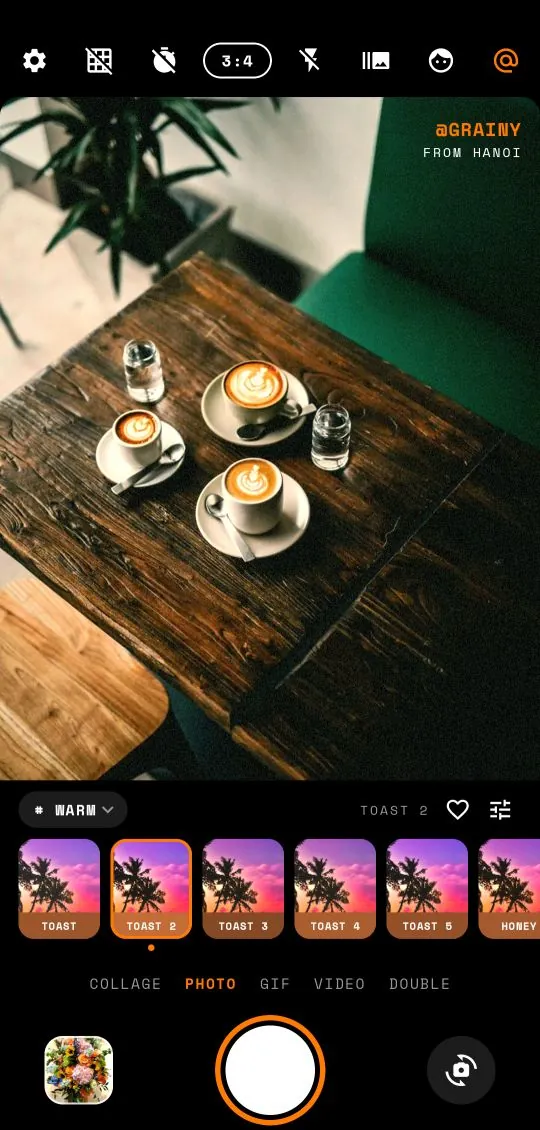
In Grainy, that means picking one preset, or two neighbouring takes from the same name, and sticking with it for the event. Not sure which? Start with the family:
- Digicam / CCD for nights out, parties and city weekends: the 2000s party-camera dump. The Y2K digicam guide goes deep on this one.
- Faded film for summer, beaches and holidays: the shoebox-of-prints dump.
- Warm analog for autumn, dinners and cosy weekends: the golden-hour dump.
- Cinematic for road trips and city nights: the film-still dump.
- Black and white for rainy cities and moody weeks.
- Clean for bright, minimal, everyday dumps.
The guide to the preset families explains each one in more detail. Tap the heart next to your chosen preset so it is one tap away all week.
Keep the ratio the same too. Mixing tall, square and wide photos in one carousel makes the app crop them unpredictably. 3:4 is a safe choice for most social apps and feels like an old camera.
Shooting for the dump
The difference between a forgettable dump and a great one is usually decided in the moment, not in the edit. A few habits help:
- Shoot more than you think. A ten-slide dump needs thirty or forty photos to choose from. Small, ordinary moments are what make it, and you only get them by shooting all the time.
- Shoot with the look on. Because Grainy shows the preset live, you can see whether a scene works in the dump's style before you take it. A scene that looks dull in the viewfinder will look dull in the carousel.
- Use burst for moving moments. Set burst to 3 or 5 shots from the top bar for laughs, jumps and traffic. Keep the best, or the funniest.
- Turn on the flash at night. The flash is half of the party-camera look. Use it close.
- Do not wait for perfect. Wonky framing, a thumb in the corner, a blurry hand: in a dump, imperfection reads as real. One or two "mistakes" per carousel is part of the style.
Already have the photos from earlier, taken with a different camera? Open them in the Studio and apply the same preset, so they match the rest.
The ingredients of a good dump
Look closely at dumps that work and you see the same ingredients again and again. You do not need all of them, but a mix of four or five keeps a carousel interesting.
The anchor
One strong photo that sums up the event: the view, the group, the outfit. It usually goes first.
People, but not posed
A friend mid-laugh, someone from behind looking at the view, hands around a cup. A dump with no people at all can feel cold.
The detail
Close-ups: a menu, a ticket, a key, a sticker on a lamp post, a tiny cake. Details give the carousel texture and give the eye a rest between bigger scenes.
The place
A wide shot of where you were. A street, a beach, a room, a skyline from a window.
Food and drink
The universal language of the photo dump. Shot from above or with flash.
The mirror selfie
At least one, preferably in an interesting mirror: a lift, a shop, a hotel bathroom with good tiles.
Something moving
A GIF or a short video in the middle of the carousel makes people stop. Twelve frames of a laugh beats any still.
The collage or the double
A four-grid collage squeezes several moments into one slide; a double exposure adds a dreamy note. Use one, not five.
The random one
A photo that makes sense only to you: a strange sign, a pigeon, the ceiling. It is what makes it a dump.
Ordering the slides
Most social apps show the first slide in the feed, so it does most of the work. After that, rhythm matters more than chronology.
- Slide 1: the anchor. The most striking, readable picture.
- Slide 2: something human. A person, a face, a hand. It tells people this is a story, not a postcard.
- Slide 3: movement or a detail. The GIF or a close-up to change the pace.
- The middle: alternate. Wide, close, person, place. Never three wide shots in a row, never three close-ups in a row.
- Second to last: the random one. The pigeon. The joke.
- Last slide: a closer. A sunset, a goodbye wave, the way home, or a collage that sums up the trip.
Also think about colour as you order. If one photo is much brighter or redder than its neighbours, move it until it sits between pictures that are similar. Small changes in order can make a set look far more consistent.
Stamps and dates
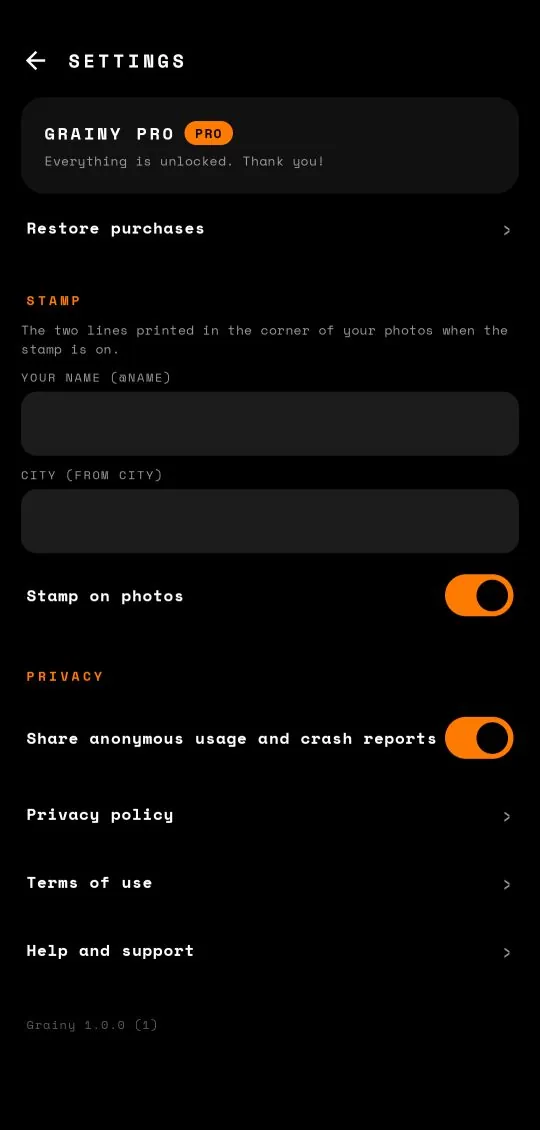
A small mark in the corner makes a dump look like it came from a real camera. Grainy has two, both switched in Settings.
The name-and-city stamp
In Settings, under Stamp, add your name and city and switch on Stamp on photos. Every photo, collage, double exposure and GIF then carries a small line of text, for example @GRAINY FROM HANOI. It works like a signature on a print: subtle, personal, and it makes a set look like it belongs together. Change the city when you travel and it becomes a travel diary.
The orange date
Orange date stamp, on unless you turn it off, prints the glowing date on Digicam / CCD photos, in the old two-digit format, like '26 10 21. It is the strongest signal of a 2000s camera, so keep it for CCD dumps; for a cleaner set, switch it off in Settings.
Use one or the other per dump, rarely both. And be consistent: a stamp on half of the slides looks like an accident.
Ten dump themes
Need an idea for this week? These themes work with any phone and almost any life.
- The week in ten. One photo a day for a week, plus three extras. Warm or Clean.
- The night out. Flash on, CCD preset, orange date. Party-camera energy.
- The trip. Arrival, food, streets, the view, a friend, the departure board. Change your stamp's city.
- The café crawl. Every cup, every window, every pastry. Faded or Warm.
- The rainy week. Wet streets, umbrellas, windows, reflections. Black and white or Cinematic.
- The home dump. Plants, morning light on the floor, the cat, dinner. Clean or Warm.
- The concert. The ticket, the queue, the stage (flash off), the crowd, the ringing ears on the way home.
- The seasonal. The first snow, the first swim, the first autumn leaves. Pick the family that fits the season.
- The colour dump. Ten photos of one colour: yellow signs, red doors, blue walls. Clean keeps the colour true.
- The friends dump. A whole carousel of the people you love. A photo booth strip collage to finish.
Common mistakes
- Too many presets. The single most common reason a dump looks messy. One look per carousel.
- Mixed ratios. The app crops some photos, others not. Pick one ratio before you start shooting.
- Ten versions of the same shot. Pick the best one. Variety of subjects, not of angles.
- Only selfies, or no people at all. Mix them.
- Too dark. A whole carousel of dim night photos is hard to read on a phone. Use the flash, raise the exposure a little in the adjust panel, or add a few brighter daytime slides.
- Over-editing. If the preset is too strong for a scene, lower the intensity slider rather than adding more effects.
- Too long. Ten slides is plenty. Twenty starts to feel like homework.
A five-minute checklist
Before you post, run through this list:
- Same preset, or two close takes, on every slide?
- Same ratio on every slide?
- Is the first slide the strongest?
- At least one person, one detail and one place?
- One moving slide, a GIF or a short video?
- No two near-identical photos?
- Stamp on all slides or none?
- Ten slides or fewer?
Everything you shoot in Grainy is saved to your phone with no watermark, ready for any social app. Nothing is uploaded by the app itself, and it all works offline. If you are new to Grainy, the beginner's guide covers every button, and the CCD guide explains how to nail the most popular look for dumps right now.
Frequently asked questions
How do I make my photo dump look cohesive?
Shoot everything in one preset family, or even one preset, so the colour is the same across every frame.
How do I add my name to photos without a watermark?
In Settings, fill in Your name and City, then switch on Stamp on photos. Grainy prints them in a small typewriter-style stamp in the corner. It is off by default.
How do I keep horizons straight?
Turn on the level guide from the grid button in the top bar or in Settings. The line turns orange when the phone is level.
Does Grainy have a beauty filter?
Yes. Beauty smooths skin naturally on the device and works under any preset. Basic is free and Strong comes with Grainy Pro.