 Grainy
The CCD Camera Look: What It Is and How to Shoot It on Your Phone
CCD cameras are selling secondhand for many times their original price, all for a look. You can get most of that look without the hunt: Grainy's Digicam / CCD family rebuilds the habits of those sensors in real time. Here is what to look for and how to use it well.
What "CCD" means
CCD stands for charge-coupled device, the type of image sensor used in most consumer digital cameras from the late 1990s until around 2010. Today almost every camera, including the one in your phone, uses a CMOS sensor instead. CMOS sensors are faster, more efficient and far better in low light, which is why they won.
But the CCD era left a visual signature, and that signature is what people mean when they talk about "the CCD look": the slightly cold colours, the crisp but crunchy detail, the blown-out highlights and the unmistakable flash. On social media, "CCD camera" has become shorthand for any cheap compact digital camera from that time, whatever sensor it really had. The tag covers a feeling more than a technology.
That feeling is what this guide is about: what causes it, how to recreate it on an Android phone, and how to shoot so the result looks like a found photo rather than a filter.
Why CCD photos look the way they do
It is tempting to think the look comes from the sensor alone. It does not. It comes from the whole cheap camera working together: a small sensor, a simple lens, a weak processor, a tiny flash and a memory card that cost real money per megabyte. Each of those pushed the photo in a recognisable direction.
- The small sensor could not hold both bright and dark detail at once, so highlights clipped to pure white early.
- The simple processor did basic noise reduction, so shadows kept a coarse, colourful noise, and white balance often guessed cold.
- The memory card was small, so files were saved at about two megapixels with strong JPEG compression. Edges rang, skies went faintly blocky.
- The flash sat right next to the lens and lit everything head-on: a hot centre, dark corners, flat faces and black backgrounds.
- The date stamp, printed in orange digits, sat in the corner of many shots because people forgot to turn it off.
Modern phones undo every one of these. They merge many frames to rescue highlights, clean the noise with AI, save huge files and replace the flash with night mode. That is why a plain phone photo with a blue tint does not look CCD. The habits are missing.
The five habits Grainy recreates
Grainy's Digicam / CCD family goes beyond colour grading. On top of the colour, each finished photo from the family gets the camera's habits applied to it, at the size an old camera would have saved it.
1. Clipped highlights
Above a certain brightness, Grainy pushes values into white much faster than normal, so a lamp, a window or a bright sky blows out with the same hard edge an old sensor gave. It is the single biggest difference between "cold filter" and "old camera".
2. Colour noise
Grainy adds blotchy colour noise in small clumps, heaviest in the shadows and lightest in the bright areas, the way a cheap sensor's noise was smeared by its processing. In a dark bar or a night street it is clearly visible; in daylight it is barely there, just like the real thing.
3. JPEG crunch
The finished picture is shrunk to a long edge of 1,632 pixels, the size a two-megapixel pocket camera saved, and compressed the way such a camera did on its normal quality setting. You get the faint halos around edges and the slight blockiness in smooth areas. It also means CCD shots are small files that send quickly.
4. Harsh flash
When the flash fires, Grainy adds the on-camera flash fall-off: a hot, bright centre that drops to dark corners. Combined with the clipping, faces close to the lens go bright and flat while the room behind them falls away.
5. The orange date
With Orange date stamp on in Settings (it is on from the start), Digicam and CCD shots get the glowing date in the corner, in the old two-digit format, for example '26 10 21.
These habits are applied to the photo you save, not to the live preview, because they depend on the picture's real size. The viewfinder shows the colour; the saved photo has the full camera character.
Shooting the CCD look, step by step
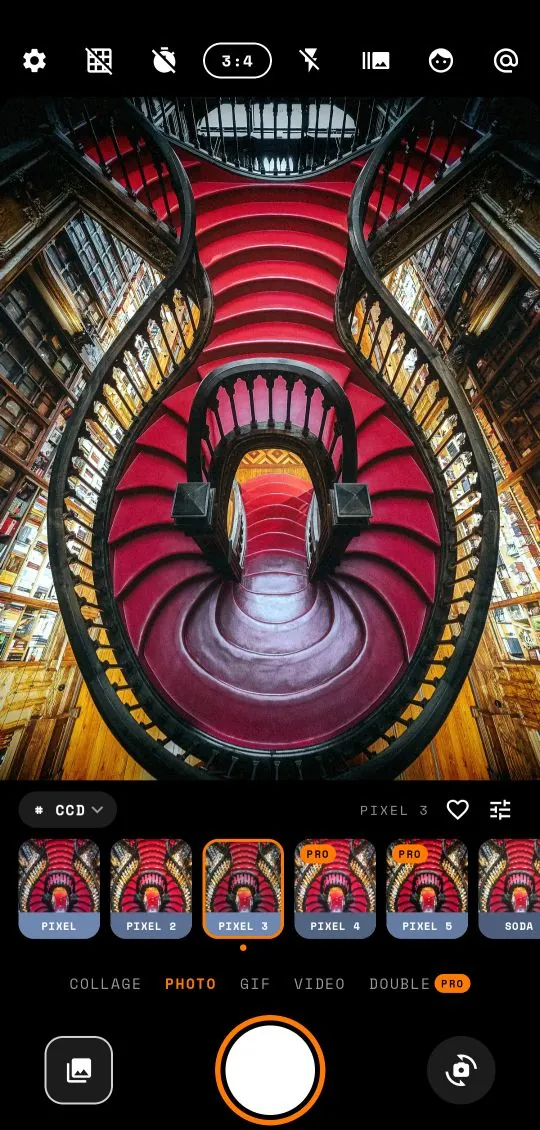
- Open Grainy and tap the family chip above the preset strip. Choose CCD.
- Swipe across the viewfinder to try the presets. Pixel, Soda, Mall, Arcade, Blink, Tamago, Disco, Memory, Jpeg, Chrome and Zoom are the names in this family, each with several variations.
- Set the ratio pill to 3:4. Most compacts shot 4:3, and the frame shape is half the illusion.
- In a dim place, tap the lightning icon to turn the flash on.
- Get close to your subject, within about two metres, and tap the viewfinder to focus.
- Press the shutter. Open the gallery thumbnail to see the finished shot with the full CCD treatment.
The date is on from the start; if you do not want it, switch off Orange date stamp in Settings and it stays off. To dial the look back for a particular scene, tap the slider icon and lower Intensity. To brighten a dark scene without the flash, raise Exposure. Both are free. The adjust guide explains the rest.
Light: the part no filter can fake
A preset can recreate a sensor's habits, but it cannot invent the light. The best CCD-look photos are shot in light that suits it. Some rules of thumb:
Mixed and artificial light is your friend
Fluorescent tubes, shop lights, neon, car headlights, fairy lights. The cool grading and the clipped highlights turn these into the bright blobs and colour casts everyone recognises. A convenience store at night is almost a cliché for a reason.
Flash works close, not far
Real compact flashes were weak. A group of friends at arm's length looks perfect; a stage twenty metres away just looks like a dark photo with a bright row of heads in front. When the subject is far away, turn the flash off and let the scene's own lights do the work.
Overcast daylight beats harsh sun
In flat grey light, the cool tones look like a winter afternoon on an old memory card. In hard midday sun, everything clips and the photo can look washed out. If you are shooting in bright sun, try a Faded or Warm preset instead, or lower the exposure a little.
Dark shadows are allowed
Do not try to rescue every shadow. Part of the CCD charm is that the camera simply could not see into the dark. Let the background go black.
CCD, digicam and film: what is the difference?
These words are often used interchangeably online, but they describe different looks, and Grainy treats them as different families.
- CCD / digicam: cool or neutral colour, hard digital clipping, colour noise, JPEG crunch, harsh flash. Crisp and a bit cheap. This is the Y2K digicam look.
- Film: soft highlights that roll off gently instead of clipping, even grain, warm or faded colour, sometimes a light leak. Grainy's Faded and Warm families cover this.
- Cinematic: graded colour, often teal shadows and warm highlights, deep contrast. The Cine family.
Mixing them in one set is a common mistake. A CCD party shot next to a warm film portrait next to a teal cinematic street photo looks like three different people's photos. Pick a lane for each set.
Six CCD shot ideas
Need a push? These scenes almost always work with the CCD family.
- The flash portrait at dinner. Flash on, arm's length, the table and glasses in front. The background disappears and the moment stays.
- The vending machine or shop window at night. Flash off, let the machine glow and clip.
- The mirror selfie. Flash on, phone at chest height, the flare as part of the picture.
- The view from a moving train or bus. Burst mode, three or five shots, keep the blurriest one.
- The flat lay. Drinks, snacks or tickets on a table, shot straight down with flash. Turn on the level guide and wait for the bubble to turn orange.
- The pet at night. Flash on, close up, eyes glowing. Nothing says old memory card like it.
Sharing CCD shots
Every CCD photo is saved to Pictures/Grainy and appears in your gallery right away, with no watermark. Because the files are small and already compressed, social apps tend to change them less than they change big modern photos, so what you post looks close to what you shot.
CCD shots look best in groups. A carousel of eight to ten photos from one night, all in the same preset and the same ratio, reads like a roll pulled off an old camera. Mix in a short GIF or a four-frame collage for variety. The photo dump guide has more ideas on sequencing.
One last detail: all of this happens on your phone. Grainy never uploads your photos, works without an internet connection and does not need an account. Read the privacy policy for the details.
Frequently asked questions
What is a CCD camera?
A digital camera with a CCD (charge-coupled device) image sensor. Many compact cameras from the late 1990s and 2000s used small CCD sensors, which gave their photos a distinctive colour and noise.
How do I turn the orange date stamp on or off?
Open Settings and use the Orange date stamp switch. It is on from the start, so the glowing date appears in the corner of Digicam and CCD shots until you switch it off.
Are the CCD presets free?
Many are. About 200 of Grainy's 330 presets are free across all six families, including the Digicam / CCD family. Grainy Pro unlocks every preset.
Can I add the CCD look to an old photo?
Yes. Open the photo in Studio, choose a preset from the Digicam / CCD family and save.