 Grainy
Shoot Retro GIFs and Short Videos With a Live Film Filter
Stills are only half of the digicam feeling. The other half is the jerky little clip or looping GIF that every early-2000s camera could make. Grainy's GIF and Video modes record with your preset applied live, so the clip saves finished.
Why movement makes a set
A carousel of still photos can be beautiful, but a single moving frame in the middle of it changes how people look at the whole thing. Eyes stop. A loop of a friend laughing, a few seconds of rain, the flicker of a neon sign: movement makes a set feel alive, like a memory rather than a portfolio.
The old cameras that inspire Grainy knew this too. Early-2000s compacts could record tiny, grainy video clips, and the animated GIF was the internet's favourite format long before short video apps. Both had a charm that came from their limits: small, choppy, low-resolution, and perfectly fine with that.
Grainy has two modes for moving pictures, GIF and Video, and both record with your preset already on. There is no editing afterwards, and no separate filter app.
GIF mode: how it works
In GIF mode, one press of the shutter captures 12 frames, 140 milliseconds apart: a little under two seconds of action. The frames are taken straight from the graded viewfinder, so each one carries the preset exactly as you see it. Grainy then builds a looping GIF from them.
A few details define the look:
- Small on purpose. Frames are 480 pixels on the long edge, like an old web GIF. That keeps the file light enough to send in any chat.
- A shared palette. A GIF can hold 256 colours. Grainy picks the best 256 for your whole clip, so the colours stay steady from frame to frame instead of flickering.
- Choppy rhythm. At about seven frames a second, movement has a slightly stuttering, stop-motion quality. That is the charm.
- Loops forever. The GIF plays over and over, so the end meets the beginning.
- Your stamp travels. If the name-and-city stamp is switched on in Settings, it is drawn on every frame.
The CCD camera habits added to Digicam / CCD photos, such as the JPEG crunch and the orange date, are for stills. A CCD preset on a GIF gives the family's colour, grain and vignette, and the GIF's own small size and limited palette do the rest.
GIF mode is free, with any free preset.
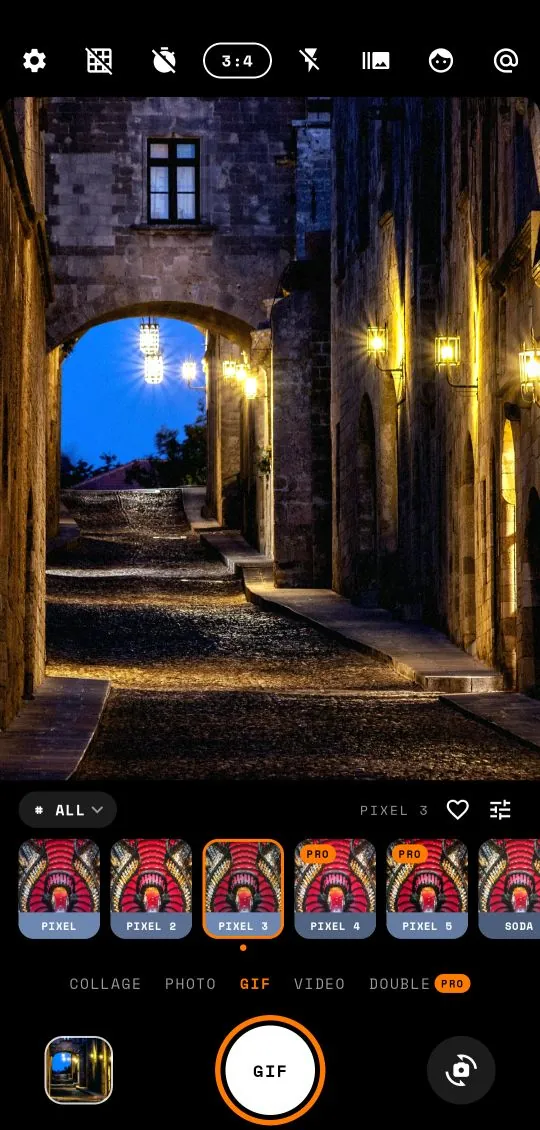
Shooting a GIF, step by step
- Choose GIF in the mode row under the preset strip.
- Pick a preset by swiping the viewfinder or tapping the strip.
- Frame the movement. Hold the phone still and let the subject move, or keep the subject still and move the phone slowly. Doing both at once usually looks messy.
- Press the shutter and hold steady. The shutter counts the frames, from GIF 1/12 to GIF 12/12.
- Grainy builds the GIF and saves it. Tap the gallery thumbnail to watch it loop.
The self-timer works in GIF mode too. Set 3 or 10 seconds from the top bar, prop the phone up and get into the frame before the 12 frames begin.
GIF ideas
Because a GIF is under two seconds long, the best ones are a single, small action that loops naturally.
- The laugh. Tell a friend a terrible joke and press the shutter. Twelve frames of a laugh is the most shareable thing you will make all week.
- The hair flip or the spin. Classic photo-booth movement. Use the timer and do it yourself.
- The toast. Glasses meeting over a table, shot close.
- The wave. At the start or end of a trip, someone waving at the camera.
- Blinking lights. Neon, fairy lights, a flickering sign. The choppy rhythm makes them look like a looping animation.
- Steam and smoke. Coffee, ramen, a kettle. Hold perfectly still and let the steam move.
- Passing trains and traffic. Stand still and let the motion streak through the frame.
- The pet. A tail wag or an ear twitch, close up.
Video mode: how it works
Video mode records the graded viewfinder as a video, with sound. The preset you see is the preset you get, in every frame.
- Length. Free videos stop at 10 seconds. With Grainy Pro, a video can run up to 60 seconds. On the free version, Grainy stops the clip at 10 seconds and tells you so.
- Size. Videos are recorded at 720 pixels on the short edge, in the shape of the viewfinder. That is crisp enough for social apps while keeping a slightly softer, less clinical feel than a modern 4K clip.
- Sound. The first time you record, Grainy asks for permission to use the microphone. If you say no, videos are simply recorded without sound. You can change your mind later in your phone's app settings.
- Where it goes. Videos are saved to
Movies/Grainyon your phone and appear in Grainy's own gallery next to your photos and GIFs.
Like GIFs, videos get the preset's colour, grain and vignette, while the CCD camera habits are reserved for still photos.
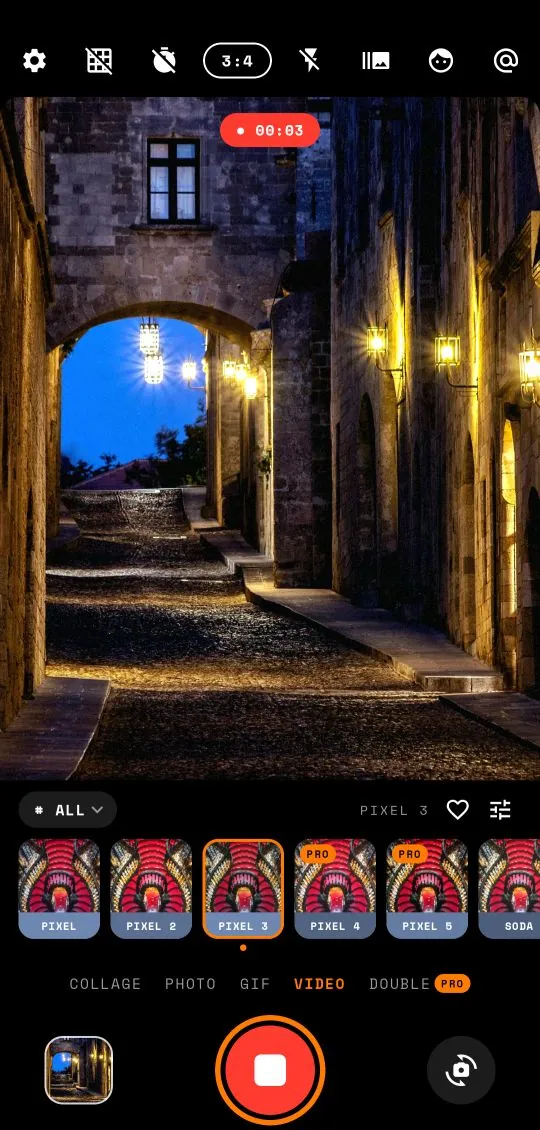
Recording a video, step by step
- Choose Video in the mode row.
- Pick a preset and a ratio. Taller ratios suit stories and short video apps; 3:4 feels more like an old camera.
- Press the shutter to start. A timer shows how long you have been recording.
- Press it again to stop. On the free version, recording stops by itself at 10 seconds.
- The clip is saved and a short message confirms it.
Keep the phone as steady as you can. Hold it with two hands, tuck your elbows in, and walk slowly with soft knees if you need to move. Shaky footage looks shakier at small sizes, and the grain makes it busier still.
Short video ideas
Ten seconds is shorter than it sounds, which is a good thing. It forces you to pick one moment.
The establishing shot
Stand still and record the place: the beach, the street market, the view from the hotel. Ten quiet seconds of a scene with its own sound makes a perfect first slide for a trip post.
The slow pan
Turn slowly from left to right across a view. Take the full ten seconds for a quarter turn. Faster than that and it blurs.
The walk-in
Walk slowly towards a doorway, a sign or a friend. Nothing says "we were here" quite like it.
The candid
Point the camera at the table during dinner and just let it run. The best moments are often the ones nobody posed for.
The detail with sound
Rain on a window, a record player, waves, a street musician. Get close and let the sound carry the clip.
The night drive
From the passenger seat, record the lights passing. A Cinematic or CCD preset turns it into a music video.
Presets for moving pictures
All 330 presets work in GIF and Video modes. A few families shine:
- Digicam / CCD makes video look like a clip from an old pocket camera. Pair it with night, neon and parties.
- Cinematic turns ten seconds of street into a film still in motion. Great for cities, rain and night drives.
- Faded is perfect for summer: beaches, pools, slow holidays.
- Warm suits people, dinners and candlelight.
- Black and white gives GIFs a silent-film feel. Very good for a laugh or a dance.
You can use the adjust panel too. Lower intensity for a gentler grade, or raise exposure in dim light. The rules are the same as for photos: intensity and exposure are free, and the other sliders are part of Pro. The preset guide and the adjust guide go into more detail.
If you choose a Pro preset on the free version, you can watch it live in the viewfinder, but Grainy asks you to upgrade when you press the shutter.
Saving and sharing
GIFs are saved to Pictures/Grainy, videos to Movies/Grainy. Both show up in your phone's gallery and in Grainy's gallery, where you can watch them, share them straight to a chat or a social app, or delete them. There is never a watermark, on any plan.
A few sharing tips:
- Mix them into a carousel. One GIF or one short video between eight photos is enough to make a set feel alive. Place it second or third, not first, so the still photos set the tone. The photo dump guide has more on sequencing.
- Stay in one preset. Shoot the GIF or video with the same preset as the photos around it, so the motion fits the set.
- Send GIFs in chats. At 480 pixels they are small and load instantly, a nice change from a reaction GIF someone else made.
- Check how apps treat GIFs. Some social apps convert GIFs to short videos when you upload. It still loops, just in a different format.
For more ways to tell a story in one frame, try a collage or a double exposure. And as with everything in Grainy, GIFs and videos are made on your phone and never uploaded by the app.
Frequently asked questions
How long is a Grainy GIF?
A GIF is 12 frames taken 140 milliseconds apart, about 1.7 seconds, looping. Frames are 480 pixels on the long edge.
How long can a video be?
Up to 10 seconds on the free version and 60 seconds with Grainy Pro.
Does video record sound?
Yes, if you allow microphone access the first time you record. If you deny it, videos record silently.
Where are videos saved?
Videos go to Movies/Grainy and GIFs to Pictures/Grainy, so both show up in your gallery.